Carpet & roll goods
Carpet takeoff with the seams actually drawn.
Not a waste percentage. A real cut layout on your roll width, with every seam placed, the nap held to one direction, and the pad quantified on its own. Runs in a browser, on whatever computer you already own.
What you get back
The drawing, not just the number.
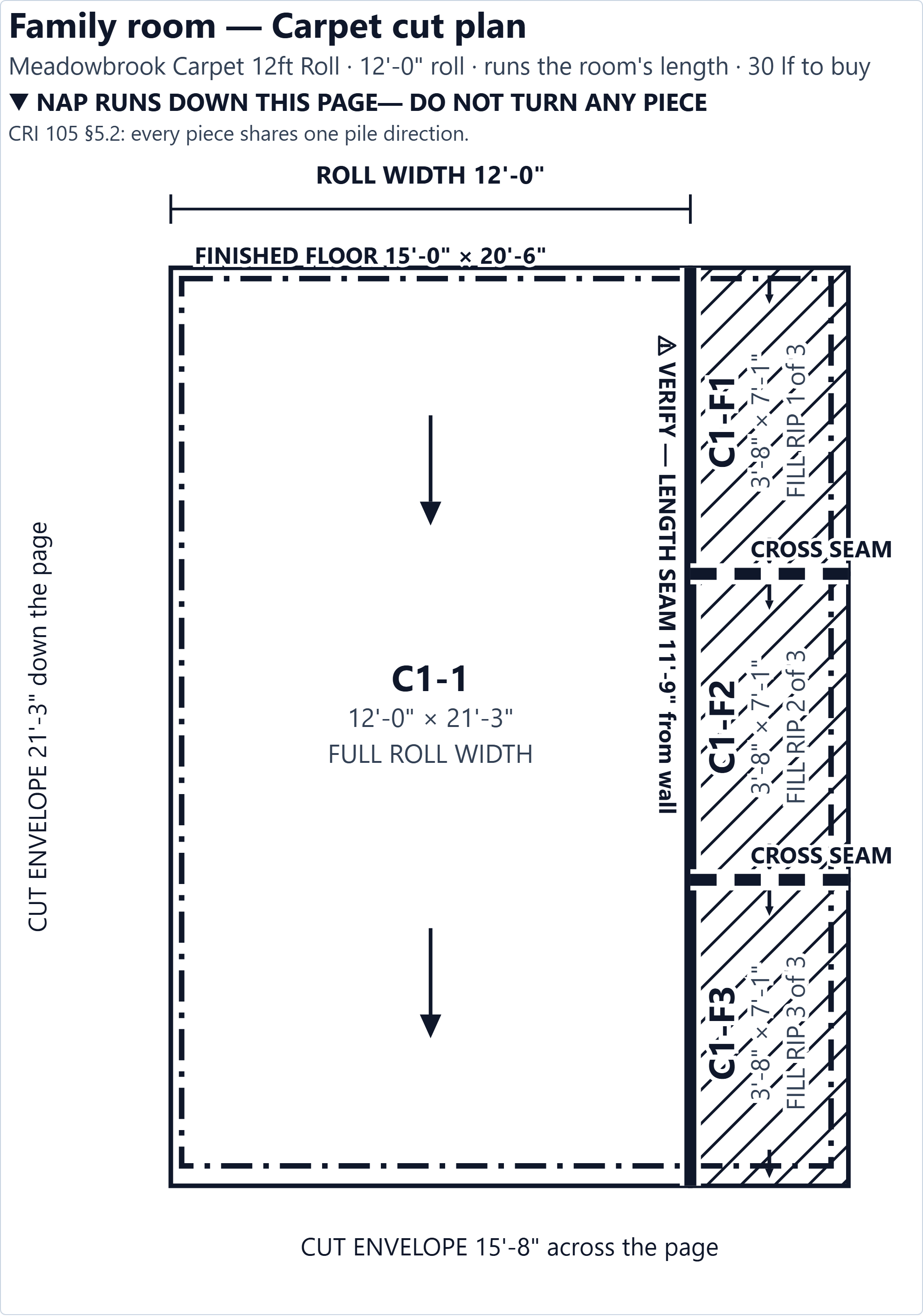
This is a real cut plan out of the app, for an L-shaped family room with a bay, carpeted off a 12-ft roll. Every piece is drawn at scale on the roll it comes off. The seams are marked and labelled with where they fall. The nap arrow is on every piece, and the sheet says do not turn any piece — because that is the rule the whole layout is built on.
It carries the room name, the material, the roll width and the linear feet, so it stands on its own in the van. Print it and hand it to whoever is cutting.
Why this is the whole argument
Seam layout is what RFMS Measure, MeasureSquare and FloorRight charge what they charge for. It is the reason the category starts at $86 a month, per seat, on a Windows desktop. There is nothing else in the market that draws this in a browser tab at all — at any price, on any machine you already own.
Why carpet needs its own engine
FlooringFlow runs two quantity engines and picks by the material, not by the room. Put carpet on a room and it stops being an area problem.
A percentage is the wrong tool for carpet
On box goods, waste is an input: area x (1 + waste), rounded up to whole cartons. On a roll it is an output. You buy linear feet of a full roll width, so a 15-ft-wide room off a 12-ft roll buys a full drop plus a fill whether you like it or not. Multiply that room by 10% and you will be short.
Nap means you cannot turn a piece to make it fit
CRI 105 §5.2: every piece in a space runs the same way. That single rule is what makes carpet a layout problem rather than an area problem — the nesting trick that saves hard surface is not available, and a solver that rotates pieces to nest them is quietly specifying an install that will shade.
It picks the better install, then shows you the cheaper one
Where a room can be cut two valid ways, both are worked out and ranked: fewest T-seams first, then seams out of the walking line, with material as the last tie-break. The plan not taken is costed beside it in seams and in dollars, so taking the cheaper cut stays your decision instead of being made for you silently.
Pad is a second material, not a multiplier
Cushion is 6 ft wide against carpet's 12 or 15, and CRI 105 puts its seams at right angles to the carpet's. Different width, different seam rule, different layout — so it gets its own cut plan and its own priced line. Nothing here derives a pad quantity by multiplying the carpet's.
The waste number is a result, and it says so
Nothing on this screen multiplied an area by a percentage. The cuts were laid out, the linear feet were added up, and the percentage is the difference between what you buy and what covers the floor.
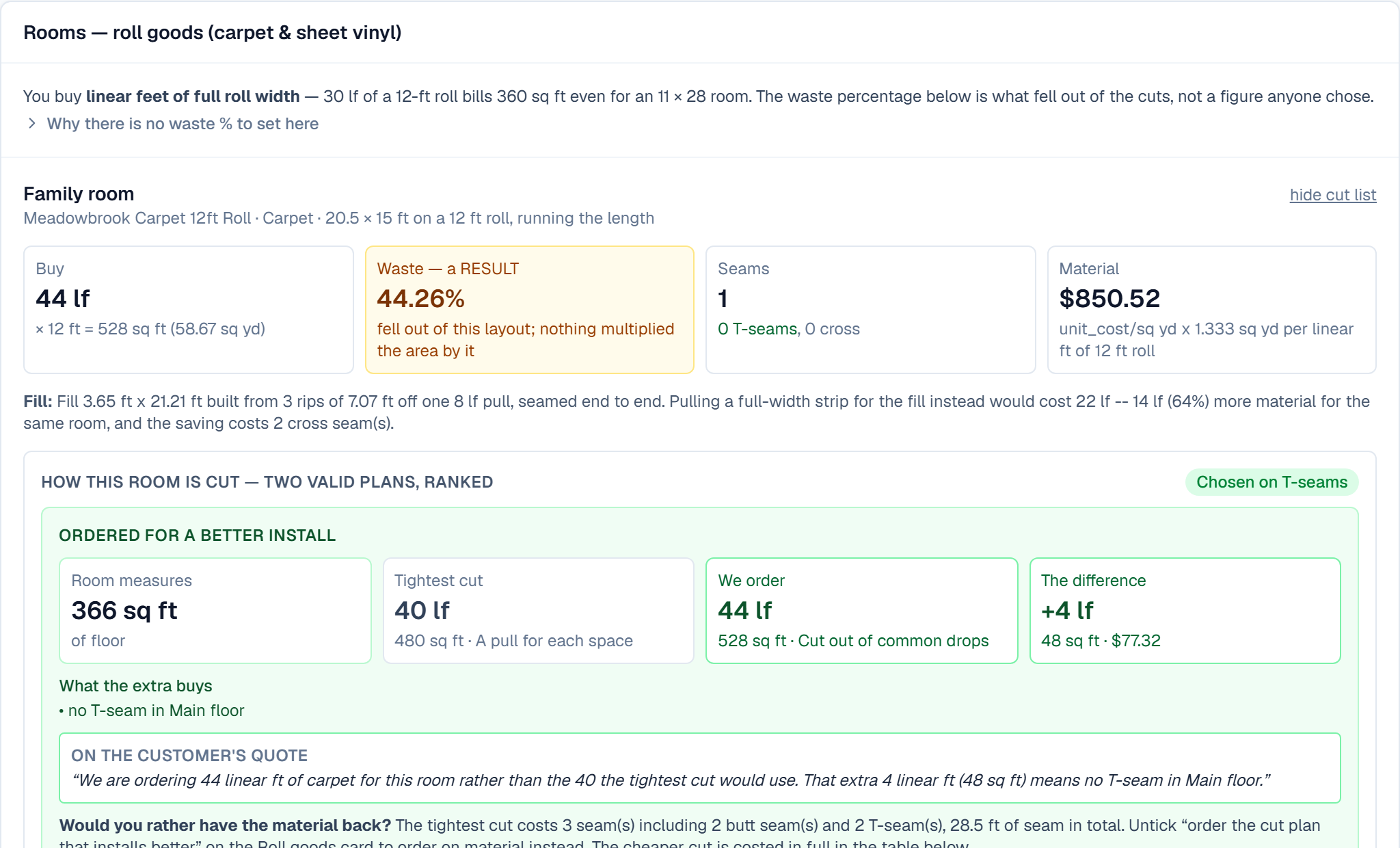
That 44% is not a sales number and we are not hiding it
An L-shaped room with a bay, off a 12-ft roll, wastes a lot of carpet. That is true of the room, not of the software — and it is exactly the figure a percentage-based estimate cannot show you, because a percentage is an assumption you typed in rather than an answer anything worked out. If you would rather buy the tightest cut, the panel below tells you what that costs in seams and lets you take it.
It orders the nicest install, and prices the alternative
Two valid ways to cut the same room are not two equally good installs. A T-seam in the middle of a family room is a callback waiting to happen, and it is worth more than the four linear feet it costs to avoid.
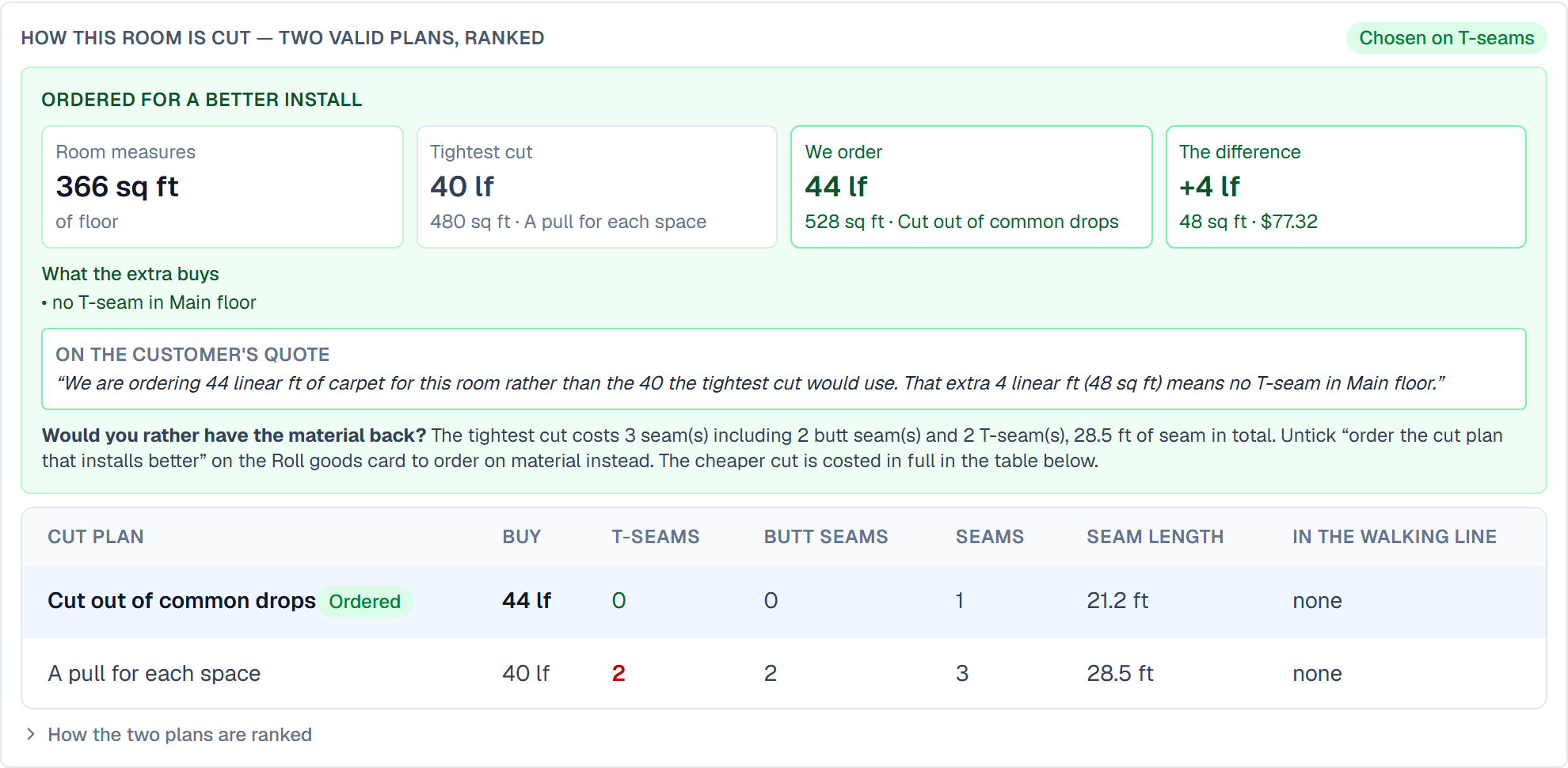
Most estimating software optimises for material, because material is the number it can see. The install is the number your customer sees, every day, for fifteen years. So the default here is the better install, the extra material is broken out as its own figure with a plain sentence explaining what it buys, and the cheaper cut stays one click away with its seam bill attached.
What it covers, and what it does not
We would rather you find this out here than on a bid.
In the cut plan today
- Broadloom carpet and sheet vinyl, on your actual roll width
- Full cut list: every piece, its size, and which pull it came off
- Seam plan — length and cross seams, where each one lands, and why
- A to-scale cut diagram you can print and hand to the cutter
- Nap direction held to one axis per space, per CRI 105 §5.2
- Pattern repeat applied per cut, not once per room
- Stretch allowance for stretch-in, trim allowance per cut
- Fill strategy: full-width strip or rips, with the material/seam trade priced
- Carpet cushion laid out separately, on its own roll width
- L-shapes, bays, closets and hallways as their own rectangles
- Islands and hearths recorded as obstructions — and NOT deducted
Not offered
PDF, blueprint or CAD takeoff
You enter dimensions, rectangle by rectangle, the way you write them on a measure sheet. FlooringFlow does not read a plan, and there is no drawing canvas or auto-tracing.
Doorway positions
Seams are placed against the room and its rectangles, not against openings — because nothing records where your doors are. The engine says so on every room rather than implying it knew: walk the room against the seam lines on the diagram before you cut.
LiDAR room capture
A paired laser sends a distance to the app. Nothing scans a room into a model.
Carpet does not arrive on its own job. The same takeoff prices the hard surface in the rest of the house by the carton, the stairs per step and the trim by the stick — one estimate, two engines. How the box-goods side works.
A hole in the floor and a thing standing on it are not the same deduction
Give an estimator one minus-rectangle and he will use it on the kitchen island — and the order comes up short, because the drops run under the island and that carpet is bought either way. So there are two kinds. A void is a hole with walls round it: a framed bathroom inside a measured basement, a stair opening. Its floor does not exist and its area comes off. An obstruction is something standing on the floor: an island, a hearth, a column. It is recorded by name, reported, and not deducted.
And on roll goods a void does not reduce what you buy either — the drop crosses it, the piece over it is cut out and binned. What moves is the waste percentage, and the engine says that rather than claiming a saving it cannot deliver.
Run a carpet takeoff on your next bid — free.
No credit card, no sales call, no Windows machine, no starter kit. Put one room in and look at the cut plan.